No cloud subscription
Your phone and computer sync over your own Wi-Fi. There's no hosting bill and no monthly cloud fee to keep them in step.
For private music teachers
Every score, recording, and reference sitting beside the student who's learning it, plus scheduling, attendance, events, billing, and reports. All in a local-first app you actually own.
Windows & Android today · Mac, iPhone & iPad on the roadmap
30-day free trial, no card required.
Today
2 lessons
Next: Charlotte · 15:00
Built around the real teaching workflow
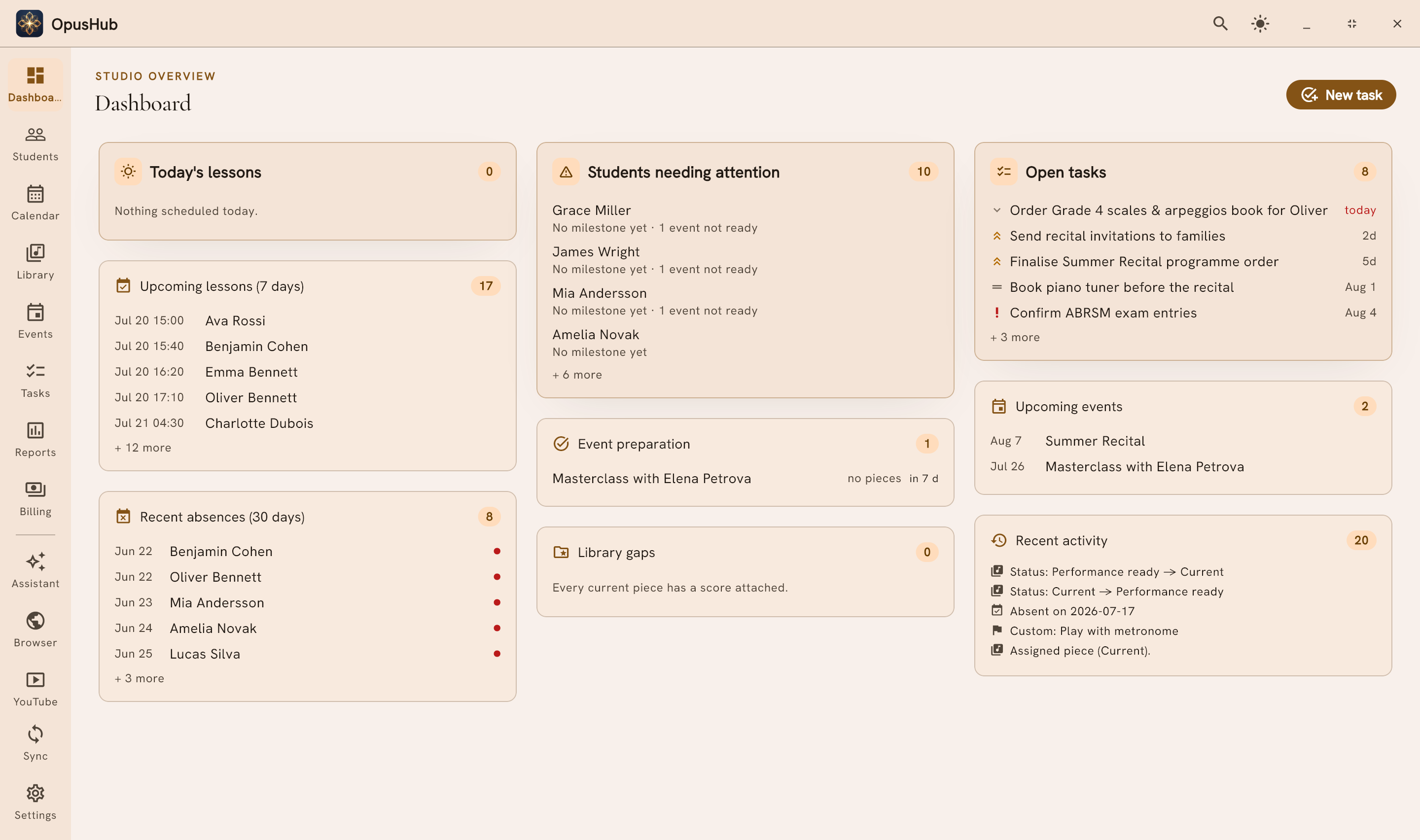
Student notes, PDFs, repertoire, recital prep, attendance, invoices, and YouTube references end up scattered across folders, spreadsheets, messages, and memory. OpusHub Studio brings that daily work back into one calm, practical workspace, with your sheet music at the center of it, not in a separate drawer.

Product tour
Every corner of the studio, connected. Pick a module, and flip through its views with the arrows on the screen.
Windows & Android
Everything you just saw runs the same on Android. Not a stripped-down companion app: the full library, students, calendar, events, billing, reports, and assistant, on your phone. Your records and files stay yours, on every device.


Your phone and computer sync over your own Wi-Fi. There's no hosting bill and no monthly cloud fee to keep them in step.
Nothing routes through our servers. Studio records and score files move directly between your own devices, and nowhere else.
Large PDF libraries copy across your local network in seconds, instead of crawling through slow internet uploads and downloads.
Teaching workflows
Open the calendar, tap a lesson, and mark attended, absent, cancelled, rescheduled, or makeup in seconds. It becomes part of the student's history automatically.
Use the built-in splitter to set the piece boundaries in one big collection PDF, and each piece exports as its own labelled score, filed in your library and ready to assign.
Assign pieces, track readiness, create event tasks, and reorder the final program before performance day.
You say
“Maria didn't come yesterday.”
Preview action
Mark absence · Maria · yesterday's lesson
Nothing touches your studio data until you confirm.
Built-in and offline
OpusHub's assistant is built in and fully offline, with no AI account, no API key, and no internet required. It handles most studio tasks for you: add students, book and reschedule lessons, mark attendance, create to-dos, record payments, and pull up the week's attendance. Every change it suggests appears as a preview card first, so you decide what gets saved.
Want more than the built-in assistant can do? Add your own OpenAI or OpenRouter API key to bring in a cloud AI model. Either way, your studio data stays on your device unless you choose to send it, and every change stays under your review.
The online layer · OpusHub Pro
Everything above runs entirely on your own devices. When you're ready to grow, OpusHub Pro adds the online tools that bring new students to your door, without giving up ownership of your studio.
Teacher profile
Publish a professional profile, with your bio, instruments, rates, highlights, and availability, at your own shareable link. It's the page prospective students and parents land on when they find you.


Online booking
Your profile carries an anonymous booking flow: a prospective student picks a time that fits your real availability, and the request lands in your studio for a one-tap approve or decline. No account for them, no back-and-forth for you.
Online payments
Turn any invoice into a secure, Stripe-hosted payment link. Families pay by card in a couple of taps, and the payment is matched back to the invoice automatically, so your balances stay right without manual bookkeeping.

Why I built it
I teach music, and I was tired of running my studio across six apps and a notebook: scores in one folder, students in a spreadsheet, invoices somewhere else. OpusHub Studio is the tool I wanted: my whole studio, and my whole music library, in one place I actually own.
The maker of OpusHub Studio
Founder & working music teacher
Pricing
Most studio apps stop at booking and billing. OpusHub gives you the entire studio: library, scores, annotations, lessons, grades, reports, and an on-device assistant, plus the online tools to get found, booked, and paid. Either way, your records, student history, and score library stay yours.
OpusHub Local
$12.99/mo
Your complete private teaching studio. Also $129/year, or $299 once.
OpusHub Pro
$16.99/mo
Get found, booked, and paid. Also $169/year.
OpusHub Studio Pack
15–25% off
Volume pricing for three or more teacher licenses.
30-day free trial, no card required. No ads, no selling data. Prices in USD, shown in your local currency at checkout.
Get started
Start your 30-day free trial, no card required. Leave your email and we'll send your download links and occasional product updates.
Product updates only. No spam.
FAQ
It is built for private music teachers and small teaching studios that manage students, lessons, repertoire, scores, events, billing, and long-term progress.
No. Piano teachers are a natural fit, but it works just as well for instrumental and vocal teachers who organize students, lessons, repertoire, resources, and performances.
OpusHub Studio is available today for Windows and Android. Mac, iPhone, and iPad are on the roadmap.
Yes. The license covers one teacher across their own supported devices, up to five personal devices, with local sync included as part of the core product.
No cloud storage is required for the core app. Your studio records live on your devices, and your score library stays in a folder you control.
Your own devices sync over your local network, which makes large PDF libraries far faster to move than uploading and downloading everything through the internet.
Yes. OpusHub is built around ownership: local records, local files, and exportable backups, so your studio data is never trapped in a hosted account.
It gives you the teaching calendar, attendance, and lesson history inside the app. Native Apple/Google calendar integration can complement that workflow.
Yes. Every install starts with a 30-day free trial with full access and no credit card required. When the trial ends, your data stays viewable and exportable.
No. OpusHub's built-in assistant is offline, needs no AI account or API key, and handles most studio tasks at no extra cost. If you want more than it can do, you can add your own OpenAI or OpenRouter key to use a cloud model. Either way, every change is shown for your review before it is saved.
Yes. Billing is optional. Teachers who do not invoice can still use students, calendar, attendance, repertoire, events, reports, tasks, and resources.